FreeCommander Guide

This guide explains how Archives staff use FreeCommander for day-to-day processing, including the custom DPLAB buttons used to create archival information packages (AIPs), review files, and batch rename scans.
Goal
Provide a practical introduction to the FreeCommander interface and the small set of actions most often used in Archives workflows.
Tutorials
| Tutorial | Use this when |
|---|---|
| 1. Create an AIP from In-House Scans | Processing newly created in-house scans from their original storage location through a verified, zipped AIP. |
Software Link
Why It Matters for Archives Work
FreeCommander is especially useful for digital archivists who need to process large numbers of files and folders quickly and consistently. For recurring archival workflows, it provides a much more efficient file-management environment than relying on Windows File Explorer alone.
Features that are especially helpful in archival processing include:
- dual-pane navigation for comparing or moving files between locations
- batch renaming for consistent file naming at scale
- quick preview with
Ctrl+Qwithout opening every file in another program - faster multi-file selection, sorting, and review
- easy visibility into filenames, extensions, sizes, and dates
- the ability to launch programs or scripts from FreeCommander buttons using the selected files as input
- practical support for repetitive file organization tasks during digitization, description, and packaging workflows
Note
Launching programs or scripts from FreeCommander buttons can be extremely useful for advanced workflows, especially when running tools against selected files, but this should be treated as a more advanced setup for experienced users.
Initial Setup
Before using FreeCommander on a Digital Processing Workstation, restore the Archives workstation settings.
- Open Tools > Restore All Settings....
- Browse to:
V:\librarydata\archives_store\dplab_admin\config\FreeCommander-Settings
- Select the most recent FreeCommander backup file.
- Restore the settings and restart FreeCommander if prompted.
Quick Preview
Select a file and press Ctrl+Q to open the quick preview panel without opening the file in another program. Press Ctrl+Q again to close the preview panel.
Use quick preview when checking files during processing, especially when confirming that scans, PDFs, text files, and logs are the expected files before moving or renaming them.
Thumbnail View
Press Ctrl+I to toggle thumbnails on or off. Thumbnail view is useful when working in folders full of images, especially when checking scan order, identifying blank pages, or spotting obvious cropping problems.
Autosize Columns in Details View
Press F8 in details view to autosize the filename and other visible columns. This makes directories of files easier to read when filenames are long or when the current column widths are cutting off important information.
Create a New File
Press Shift+F4 to create a new file in the active folder. This is the fastest way to create small working files such as .txt, .md, .py, .bat, or other plain-text files during processing.
Create New Folders
Press F7 to create a new folder in the active folder.
You can create multiple folders at once by separating folder names with a pipe character.
Example:
objects|metadata
This creates both objects and metadata.
Rename Selected Files and Folders
Select the files or folders to rename and press F2.
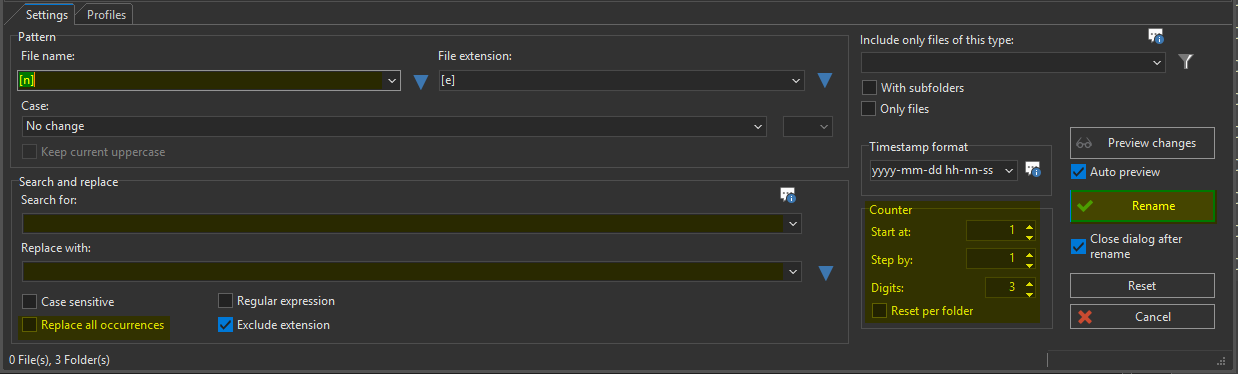
The rename window lets you build new filenames from patterns, search and replace rules, case settings, and counters. Always check the preview column before applying a rename.
Rename Pattern Basics
Use the File name pattern field to define the new filename.
Common patterns:
| Pattern | Result |
|---|---|
[n] |
Keep the existing filename. |
[n]_[c] |
Keep the existing filename and add an underscore plus a counter. |
[n]_p[c] |
Keep the existing filename and add a page number, such as _p001. |
Use Search and replace to fix parts of existing filenames before applying the final rename. Common cleanup tasks include replacing spaces with dashes, removing punctuation, or correcting repeated words.
Set Case to lowercase so renamed files follow Archives filename standards.
Counter Settings
Use [c] when a sequence number is needed.
Recommended counter settings:
- Start at:
1 - Step by:
1 - Digits:
3
With [n]_[c], a file named ca-013-001-002-001 becomes:
ca-013-001-002-001_001
For page scans, use [n]_p[c]. A file named ca-013-001-002-001 becomes:
ca-013-001-002-001_p001
Use four digits when there are more than 1,000 items, or more digits if the project requires them.
Before Renaming
- Select only the files or folders that should be renamed.
- Confirm the list is sorted in the correct order before adding a counter.
- Use the preview column to confirm every new filename.
- Do not apply the rename if the preview contains wrong dates, wrong item IDs, duplicate names, or unexpected punctuation.
Common Hotkeys
Ctrl+Q: open or close the quick preview panelCtrl+I: toggle thumbnail viewF2: rename selected files or foldersShift+F4: create a new file in the active folderF7: create a new folderF8: autosize the filename and other visible columns in details view
References
Important Reminder
Each Digital Processing Workstation should have FreeCommander installed. If it is missing, staff should notify an administrator rather than substituting a slower manual workaround.